Prior to starting your payroll, please be sure to make any necessary updates to your employee records – this includes adding new hires, changing deductions, updating salaries, etc.
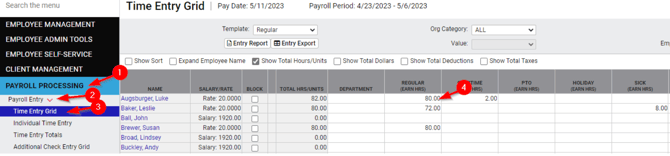
The next step will be to enter your hourly employee hours using the Time Entry Grid or Individual Time Entry – salaried employees will automatically receive their scheduled amount unless the salary is blocked OR a different number of hours is entered in the Time Entry Grid.
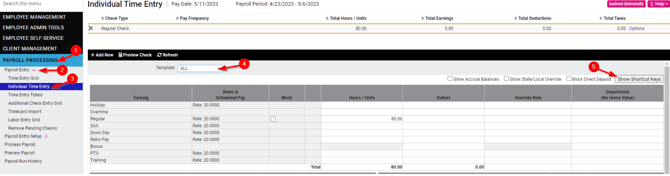
The Individual Time Entry grid allows you to focus in on just one employee at a time. In order to view ALL pay items, update your template to all – see number 4 below.
Short cut keys for adding additional rows, etc. can be found on this screen as well – see number 5 below.
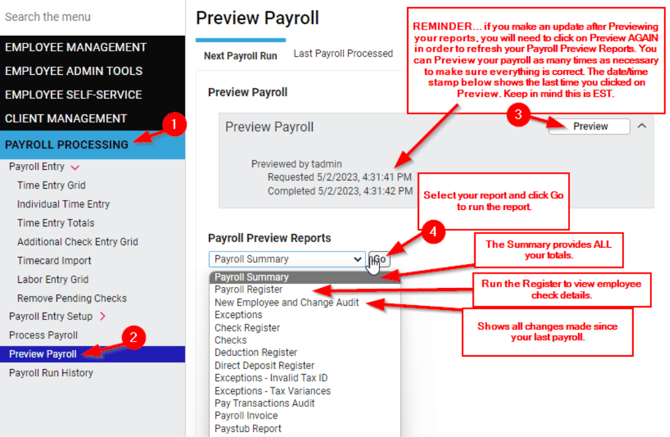
Once all employee updates are made and the hours have been entered, proceed to Preview Payroll, and run/review the following reports…
- Payroll Summary
- Payroll Register
- New Employee and Change Audit
Feel free to run any additional reports as well, these are just the three reports we recommend running at a minimum to ensure an accurate payroll.
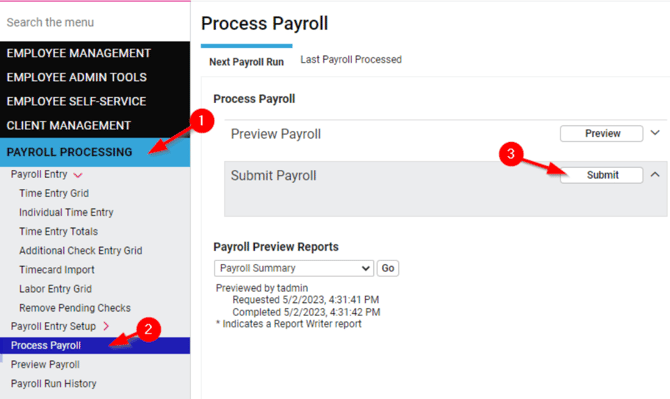
Once you have completed your review of the recommended reports, and everything looks to be correct, you are ready to Submit your payroll!
As soon as you click on Submit – see number 3, we will be notified that your payroll has been submitted and we will complete the final steps on our end.
Once your payroll has been processed by the Payroll Team, you will receive an email letting you know your payroll is complete.
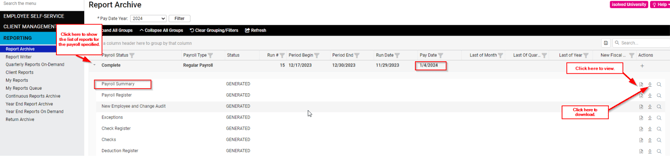
The Report Archive displays all reports scheduled to run with each payroll process. These same reports are available for Preview prior to payroll submission. Additional reports can be scheduled to appear in the Archive as necessary. The Payroll Summary (cash requirements and current, MTD, QTD, and YTD totals) and the Payroll Register (employee check details) are the two most frequently run reports.