
Skip to content
  • There are no suggestions because the search field is empty.

How do I setup my account?

Registration

You will need to provide your employer with an email address, either work or personal in order to register and use employee self service.  IF you have not provided your employer with an email address, please STOP here and do so first.

Once your employer has entered your provided email address, you will receive a welcome email with a ONE TIME USE ONLY registration link to complete your registration.  After you have successfully registered, this link will no longer work and clicking it will only give you an error.  
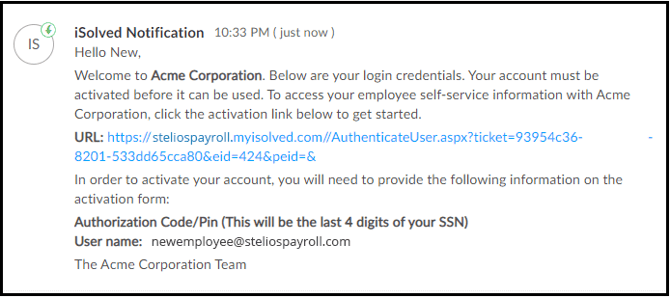
stelios_setup_1

Using the welcome link, complete the user registration form, choosing your password and security question as well as entering your cell phone number.  Your phone number will be used only for security codes and to aid in resetting your password.
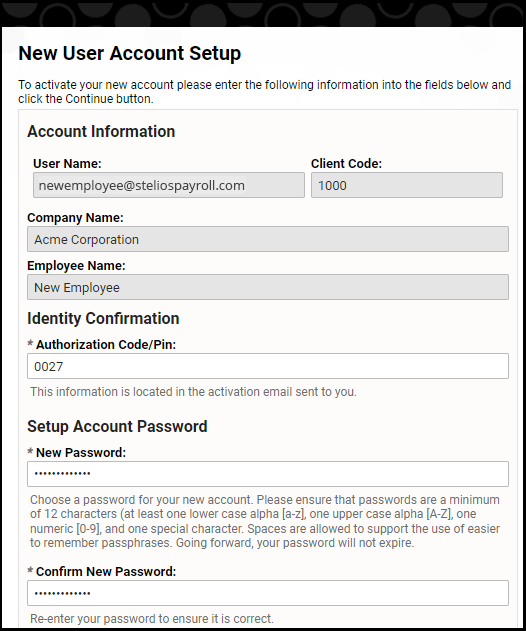
stelios_setup_2

After completing registration, you will be asked to accept the Self Service Terms and Conditions by choosing I Accept.
You may also be prompted to Agree to the Consent to Electronic Communications and Signatures. This can be used so that you will be able to receive electronic communications from your employer, and allow you to electronically sign and acknowledge receipt.
 
 
The last consent is to receive your tax forms (Forms W2 and 1099) electronically from your employer (provided your employer has made opting out of paper delivery an option).
 
 
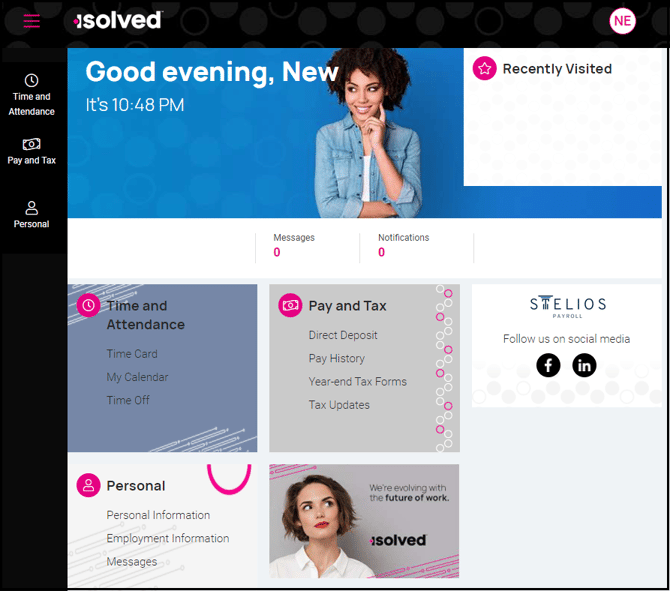
After all acknowledgements have been agreed or declined, you will be taken to the Employee Self Service Home Page.  Depending on your company's options and services, you may see a few different menu items in the various tiles.
 
stelios_setup_3
 
After completing your registration, please bookmark the following page on either on your desktop or mobile device: https://berndtcpa.myisolved.com/peoplecloud